Commitmas 2015 Is Coming!

Last year, Matt Brender created the 12 Days of Commitmas, a short series of goals and articles on how to get started with Git and make it part of your daily workflow. This year, with the help of the vBrownBag crew, we’re making it bigger and better and calling it the 30 Days of Commitmas! Every workday between 12/1 and 12/30, excepting the 24th and 25th, there will be a new lesson paired with a recorded webinar. The lessons will be focused on a small goal and in the webinar, the presenter will run through the lesson plan and answer any questions presented. I’ll be presenting Rebasing with Git on 12/11.

If you’re relatively new to Git, or know it but haven’t made it part of your daily routine, I encourage you to jump in! We’ll have a little something for people of all skill levels. If you can’t participate in real time, the lessons and recorded webinars will also be available afterward.

If you know Git well, or at least well enough to give a 30-60 minute presentation to others, we could use your help! We need 8 more presenters, as of hitting publish on this post. For those interested in presenting, find an opening on the schedule (webinars are scheduled for 9pm Eastern, we may be able to make some exceptions) and reach out to me, Matt Brender, Cody Bunch, or Jonathan Frappier – or create a fork and submit a PR!

I hope to “see” you all there!

Technical Debt Analogies

Everyone should know what technical debt is, and everyone loves analogies. What better way to explain technical debt, then?

  • Technical debt is not something you fall into, it’s a purposeful assumption of debt. You don’t fall into technical debt, just like you don’t trip and end up with a mortgage on a house – you make the decision to buy a property on credit and go through the effort of ending up with a lot of debt.
  • Technical debt often has a grace period, but it eventually needs to be paid off. It can be like a student loan, you get 6 months after you graduate before you start to owe money.
  • Technical debt’s interest payments increase if you put off paying them. When you don’t pay your minimum payment on your credit card, you get hit with a late fee and your APR skyrockets. Same thing.
  • Rewriting your application to avoid technical debt is like bundling your mortage in a mortgage-backed security and selling it to someone else in your company. The debt didn’t go away and you get to avoid it, but you hurt the economy a little bit. And in the end, you probably end up with another mortgage (technical debt) anyway.

Have I missed any other good ones?

Footloose: A modern day 2112

I blame Ryan McKern for this post, and his silly “head canon” ideas (such as Ronin being a prequel to Meet The Fockers). In that spirit, here’s an exercise in head canon.

While listening to Rush’s 2112 in the car this weekend, for some reason it suddenly struck me that the movie Footloose is really just 2112 set in the current day (don’t ask me how those dots were connected, I have no idea!). They are similar tales of artistic oppression and a revolt against the authorities upholding the suppression. The kids (Anonymous, 2112) want to dance (play guitar), but the town council and the Reverend (the Priests of the Temples of Syrinx) have outlawed it because they want to exert control over everyone’s way of life. When the kids challenge the town council, they are told it’s dangerous and not productive (“Yes, we know, it’s nothing new /It’s just a waste of time … Another toy that helped destroy / The elder race of man”). The ending is a bit different because it’s a Hollywood film, so Kevin Bacon doesn’t commit suicide and there’s no armed revolt against the government, but the kids do get into a fight at the end!

One significant difference: the music is MUCH better in 2112!

Introducing generate-puppetfile, or Creating a ruby program to update your Puppetfile and .fixtures.yml

About a month ago, I whipped up simple shell script that would download some puppet modules and then generate a valid snippet of code you could insert into your Puppetfile. This was helpful when you wanted to add a single module but it had dependencies, and then those dependencies had dependencies, and then 30 minutes go by and you have no idea what it was you set out to do in the beginning. As I started using it, I realized this was only half the battle – I might already have some of those dependencies in my Puppetfile and adding the same modules again doesn’t work.

So I started adding to the script and quickly realized a shell script was not sufficient. About three weeks ago, I decided to convert it to a ruby program and add cli arguments to support all the new features I wanted and that some users were requesting. I had a few problems I knew I needed to solve, namely how to parse an existing Puppetfile and pull out the existing forge modules, how to combine that and any non-forge module data with the new module list and generate a new file, and how to generate a .fixtures.yml file. I also ended up with a boatload of problems that I didn’t know I needed to solve.

Continue reading

Short Thoughts On Security

Security isn’t about being secure.

That’s a bold, but honest statement. Sure, you want to be secure, but it’s not a realistic end goal. No matter how much you “practice” security, it never “makes perfect.” Someone always has more time or resources to throw at attacking you than you have to defend yourself, whether we are talking about physical or cyber security. Burglars have just as much relatively overwhelming capability as nation sponsored and endorsed hackers. This has held true for centuries (16-17th century pirates were often state sponsored!) and we should expect that to hold true for the foreseeable future as well.

Accepting this premise leaves us with a bit of a quandary. If security is not about being secure, what is it about?

Security is about reducing the risk and scope of vulnerabilities. The risk is the likelihood of any given vulnerability to be exploited. Storing everyone’s passwords in the clear but having restrictions on people and applications that can access it may have a lower risk than encrypted passwords that are exposed on GitHub. Scope is the range of impact the vulnerability would have, direct and indirect. A full 100%  cleartext passwords would be available to exploit immediately, a much larger scope than encrypted passwords that would take time to exploit and likely never reach 100% availability.

When designing and implementing security, stop believing that you will build a “secure” product, whatever that is. Analyze potential vulnerabilities by risk and scope and make informed decisions about how to address them. The aim is to reduce both risk and scope to acceptable and reasonable levels given your outstanding technical debt, your available resources, your regulatory environment, and your user base. This means you will inevitably have to decide between compromising the security or the usability of the systems you design. The analysis you’ve already performed will give you confidence to make the correct decision in your circumstances and give you an understanding of the limitations of that decision.

Revisit your vulnerability analysis on a regular basis so your security posture can be improved over time. You can’t afford to make your home as secure as Fort Knox, and most of our employers can’t afford to do the same either, but you can get closer every day. This is the true practice of security.

Inspired in part by Eric Wright’s recent article Thinking Like the Bad Actors and Prioritizing Security

Keeping a Work “Diary”

Cody Bunch has been discussing note taking on twitter recently and has started a grand experiment today. I believe that Cody wants to dive into all the potential uses of note taking throughout our workdays and is soliciting feedback. I can’t speak to the entirety of taking notes as an IT person, but I’d like to share some information about my work “diary”.

I do keep a journal for work. No, I don’t write “Dear Diary” at the top of every page, but I do write in my journal every day so I jokingly call it my diary. As you may have guessed from the word “write”, it happens to be a paper and pen journal. I keep things short and to the point, so an 8 hour day rarely takes more than half a page in a college ruled notebook. It’s not meant to be exhaustive, but to capture the essence of a day or an outage – most of the details would be in a ticket number I reference. I also note when I’m working on a weekend and when I take vacation. For instance, my journal around Thanskgiving will look something like this:

11/25/2015

Processed a bunch of account creations, apparently everyone really wants to work on the holidays!

At lunchtime, $customerX blew up. $SiteY required an RMA of their $widget. Their building got hit by lightning last night and apparently our equipment wasn’t the only thing affected. Hope nothing else dies from this. Ticket 123456789

Watched a video about $technologyZ. Pretty awesome that you can foo the bar with it! Looking forward to some lab time with it next week, but first: TURKEY

11/26/2015 – Thanksgiving, holiday, TURKEY NOM NOMS

11/27/205 – holiday

Someone didn’t get their account request in on Wednesday so I got called at 7am to take care of it for the holiday crew. Boo.

A customer’s building got struck by lightning, which might be important if another piece of equipment dies next week. My holiday and vacation time is recorded so I can put those in the time system or use it as evidence if I get audited. I wrote up when I got an “on-call” engagement; this may be useful if I find myself getting called too many times for documented tasks. I can pull these events and ask my manager why I’m getting woken up in the wee hours constantly for things that shouldn’t require me. Whatever it is that happens, I’ve got it recorded along with tickets numbers that provide more precise details. I also keep it light and humorous, it’s for myself – but I write as if other people may see it. No slandering coworkers or customers.

I have been doing this a while. I have work journals going back to 1997. I can look up that time we had a freak tornado in Pittsburgh, PA, our building got struck by lightning, and 70% of our hubs were blown out because of a lack of surge protection (spoiler: tornados suck). I can also look up the last 6 months of issues for a customer and tell my boss whether they’re having more or less outages over time. That’s really useful, especially for some of the seemingly unconnected-at-the-time events that later prove to be connected, or systems that are difficult to search or correlate information in. But that’s not the real reason I keep a journal, just a bonus.

The real reason I write in my diary every day is that the act of writing a note to myself, with a pencil on a piece of paper, reinforces the memory I am describing. Most days, I couldn’t tell you what I ate for lunch the day before. But I can tell you that I held a meeting with a customer and found a solution to their problem, because I lived it, I wrote it down, and then I read it back to myself and remembered it again. I’ve tried electronic diaries and I don’t have the same success in recalling previous memories. The tactile sensation of the paper and the pen, where I place the words on the page – even the misspellings that I scratch out and rewrite correctly next to the original – and reading the entry back to myself; these sensations and actions help me move the memories of the day from short-term to long-term memory and recall them more easily. In most instances, I don’t actually need to refer to the journal, because now the memory is already accessible! There’s even science that shows how recall from words on paper is generally higher.

If you find yourself with a poor memory of your work week, or just need a little more precision in your memories, try keeping a work diary on pen and paper. You may find that a few weeks of a diary helps out. This may not work for everyone, though. If you have other tips for keeping a diary or note taking in general, drop them in the comments!

Travis CI Build Shield

I was looking at the puppet module zack/r10k’s github repo the other day and I noticed these fancy shields all over it. They include the version and number of downloads from the Puppet Forge and a label that says build | passing. This comes from Travis CI. By adding the shield syntax to your repository’s README.md file, you can have this shield as well. Here’s the syntax, substitute your github user and repo names where appropriate (unless you want to display the build status of my certs module for some reason) and use travis-ci.com for private repos:

[![Build Status](https://travis-ci.org/rnelson0/puppet-certs.png?branch=master)](https://travis-ci.org/rnelson0/puppet-certs)

You should add this in a new branch, of course, along with any other shields you want to use. There are plenty available at Shields.io! Before you create a PR, however, there are two other changes you need to make. First, an edit to your .travis.yml:

branches:
  only:
    - master

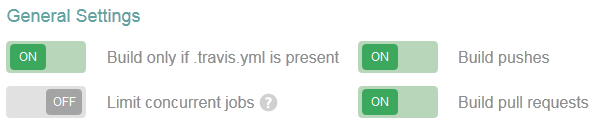
This tells Travis CI to only perform builds against the master branch. You can add additional branches if you want, of course, and you’d change your shield’s ?branch=master text to the other branch name. The next step is to change your Travis CI settings for the repo:

Travis CI Badges Fig 1

Build pull requests was probably already enabled, so that when you created a PR Travis CI would test it, but Build pushes may have been disabled. With Build pushes enabled and the only setting of master, any push to the master branch – which includes merging a PR into the master branch – will kick off a Travis CI build. You can now go ahead and create your PR and merge your changes. The shield will initially say unknown for the status. If you look in Travis CI, you’ll see a build start for the master branch, and shortly thereafter it will complete. Refresh the view of your repo’s main page or README.md and you should see the shield update to the status of the latest build!

Travis CI Badges Fig 2

If you did things out of order, like enabling Build pushes after the PR is merged, will still have an unknown status. You can either hold tight until your next PR/merge or do a simple change on master. An easy change is to edit the README.md through github.com and add a blank line at the end. When you hit save, GitHub creates a new commit, which again counts as a push, and therefore Travis CI starts doing a build. Voila!


Using Negative Controls

We just discussed the use of positive controls in hypothesis driven troubleshooting. Next, we need to talk about their opposite, negative controls. Where a positive control is something that we expect to produce a result, a negative control should produce either no result or a negative result. For instance, you might expect a certain IP to not respond to ICMP, or to receive permission denied when using the wrong password.

Negative controls can be used as part of the baseline, just as positive controls are. Before you implement a service, the client should get no response from the service. Disabled or inactive members should also provide no response. Attempting to access the service on something that isn’t hosting the service at all should certainly provide no response. An invalid password generates an invalid password error. Instead of assuming everything behaves the way you expect, test each assumption and classify it properly as a negative or positive control.

A negative control can also be used to ensure that troubleshooting goes according to plan and individual steps do not have inadvertent side effects. A firewall rule to allow access to a set of networks and ports should not allow access to other ports, and a negative control that continues to work ensures that this is the case before and after the change. If you aren’t sure of the effect of something, the combination of negative and positive controls can help you determine that effect.

One thing to note: Where positive controls are helpful in their own right, negative controls almost always require additional positive controls to be useful in troubleshooting. If something is not responding and continues to not respond, that information on its own rarely moves the diagnosis or recovery forward.

You now have the tools to build two sets of experiments, before any change occurs and after a change is made, to test your hypothesis and carry on effective troubleshooting. I hope this helps!

Using Positive Controls

I’ve written before about the importance of hypothesis driven troubleshooting. The hypothesis is, of course, very important. So is the testing methodology. Let’s talk about positive controls. A positive control is where you test something that you expect to behave a certain way, and it does so. Positive controls help prove that your assumptions about the system (your world-view) is correct. When a positive control fails, it’s either because of user error or that we have a poor understanding of a system and we need to re-define our positive controls. Validation of the positive controls ensures that we spend our time testing valid assumptions.

In the context of IT, positive controls are often equivalent to our “baseline” measurements – but we also test our positive controls “at runtime” to ensure the historical measures are still accurate in the present. Today, we’ll use ping tests (ICMP) for positive controls, because it’s a simple model that everyone understands.

The Problem

A user contacts you and says they cannot access a site you support. They can’t ping it and they can’t traceroute it. Your intuition leds you to form a hypothesis that their remote office’s router is experiencing an issue. Sounds probable, anyway. You need to test the hypothesis and the first inclination is to tell the customer to ping their router. You might get something like this:

C:\>ping 10.0.0.1

Pinging 10.0.0.1 with 32 bytes of data:
Reply from 10.0.0.201: Destination host unreachable.

Ping statistics for 10.0.0.1:
    Packets: Sent = 4, Received = 4, Lost = 0 (0% loss),

Ah ha, problem solved! You have the user reboot the router… and their problem persists. Crap.

Establishing Positive Controls

There could be any number of reasons for the router not to respond to ICMP. Let’s establish some positive controls to test our understanding of the present situation. First, let’s have the user ping themselves. This should absolutely work if they are on the network:

C:\>ping 10.0.0.201

Pinging 10.0.0.201 with 32 bytes of data:
Reply from 10.0.0.201: bytes=32 time<1ms TTL=128

Well, that looks much better, at least we’re getting responses from ourself! If there was no response or an error, we’d know that the assumption of “the user is on the network” is invalid. Let’s assume there’s another node on the network that we know is responsive, say a printer, and use that as a positive control to ensure that the network itself is working.

C:\>ping 10.0.0.3

Pinging 10.0.0.3 with 32 bytes of data:
Reply from 10.0.0.3: bytes=32 time<1ms TTL=64

Again, we’re looking good. A failure here might indicate a local network issue – user is in the wrong VLAN or the switches are messed up.

Real World Application

If we had established these positive controls before we started, we would have known for sure that the LAN was not the issue. However, if the positive controls failed, we would have rebooted the router for no good reason and could have affected other users unnecessarily. If that router had some important changes that weren’t saved, the reboot may have made things worse!

Hopefully you can see how to create positive controls for more complex systems. If an SQL query is failing, try a simple “select * from <table>;”. If an application’s errors are not making it to the central syslog server, test if a syslog message from the application server makes it to the central syslog server. Write down your assumptions and you can almost always make them into positive controls (or negative controls, but that’s another article).

Define your positive controls alongside the hypothesis. Test them first so that you can verify the world-view is solid before testing the hypothesis itself. If your positive controls fail, your world-view is incorrect and it’s back to the drawing board!

30 in 30 Blog Writing Begins!

Last year, I participated in vDM30in30, a spin-off/shout-out to National Novel Writing Month (NaNoWriMo) but focused on bloggers. The goal is to write 30 blog posts in 30 days. It’s a spinoff from virtualdesignmaster.com, but it’s not just for people in the virtualization community. It’s for anyone who has a blog – or always wanted to start a blog – and wants to try for 30 blog posts in November.

The goal is 30 posts in 30 days. Some people do one post a day, some just write whenever the mood strikes. Some schedule all 30 posts ahead of time, some schedule a few or none. Some posts are really long, others just a paragraph or two. Some people write all 30 posts or even more, others don’t (I only got to 25 last year). It’s whatever you want it to be. What’s important is that you’re practicing your writing skills, getting into the habit of writing, and sharing with others. All you need to do is tag your blog posts with the category vDM30in30 and use the hashtag #vDM30in30 if you publicize on social media.

So, are you with me?

Learn more about vDM30in30 here and keep up with everyone’s posts by tracking the hashtag. You can also tweet your participation @discoposse to be added to the vDM30in30 list.