#PuppetConf 2015 Wrap-Up

I mentioned over the spring/summer that I was headed to PuppetConf 2015, which happened last week. It was a blast! I highly recommend that if you use Puppet, you find a way to make it to PuppetConf 2016 which will be held in San Diego.

There were a lot of great events, official and unofficial, throughout the week. I met a ton of people, way too many to mention individually, and made a lot of friends. I live tweeted three of the event days, which are storified, and here are some highlights:

Contributor’s Summit: This is a great opportunity to become involved in the community. You can contribute docs, code, or commentary. I’m serious about the last, lots more time was spent on designing than coding things. A few of us – Henrik, Felix, Vanessa, and myself – sat down to attack HI-118 and created something. Plenty of other people and groups created their own things. I saw lots of ways to do the same things and also the awesome puppet-retrospec, which creates rspec-puppet tests for all .pp code in a module. It’s very naive at this point, but it’s better than not having tests!

Sessions, Day One: At the keynote, Puppet’s new Application Orchestration was unleashed. This is seriously awesome. Define your application’s microservices, then assign nodes to provide the services. Need multiple nodes for a service? Assign more than one. Want a node to provide more than one service – say, a single SQL server that serves more than one database? Assign multiple services to that node. It’s pretty simple but pretty powerful. Of course, we only got to check out some demos in the demo section of the Exhibit Floor, but it’s very promising.

I attended a number of sessions, of course:

  • State of the Puppet Community – Kara Sowles & Meg Hartley, Puppet Labs
  • 200,000 Lines Later: Our Journey to Manageable Puppet Code – David Danzilio, Constant Contact
  • Infrastructure Security: How Hard Could it Be, Right? – Ben Hughes, Etsy
  • Identity: LGBTQ in Tech – Daniele Sluijters, Spotify
  • Hacking Types and Providers – Introduction and Hands-On – Felix Frank, mpex GmbH

Sessions, Day Two: Today’s keynote showed a bit more of the Application Orchestrator but also focused on the speed and capabilities of some C++ prototypes for facter and puppet. They’re blazing fast. I also spoke on Puppetizing Your Organization! That was terrifying but rewarding. If you have something to share, PuppetConf is the place, it’s extremely friendly and rewarding. Here are the sessions I attended:

  • Thriving in Bureaucratic Environments – Ashley Hathaway, IBM Watson
  • Application Modeling Patterns – David Lutterkort & Ryan Coleman, Puppet Labs
  • Building Communities – Byron Miller, HomeAway.com

After the last session, I had to head home immediately and take a red-eye. I missed out on the pub crawl and some of the after activities, but I had a great time while I was there. Hello to everyone I met there, thanks to everyone who contributed to my presentation and made it that much better, and especially thanks to everyone who showed up to my talk! Hopefully I’ll see you all in San Diego next October!

Update: I forgot to mention how great the Oregon Conference Center was. By far one of the most organized conferences I’ve been to and absolutely the best catered foods.
Tips for configuring a new vRO 6 Appliance

I just configured a brand new vRealize Orchestrator Appliance v6.0.3 with a vCenter Server (not appliance) v6.0U1. The deployment of the OVF is pretty simple, but configuration was trickier than I expected. VMware’s guide is accurate if everything works well but painfully inadequate if you require any troubleshooting. Take a run through the guide, I’m not going to speak to what it does cover, and if you have problems, maybe one of these tips will help you.

Authentication

Any time you change authentication, you MUST restart the vRO service. You may see all the status icons go from green to red to blue and back to green, which makes it appear that some services are restarting, but they aren’t. If you’re not sure, click the restart button as shown below. Bonus: when the page responds and says the service, the service is ready to use, unlike some other VMware products *cough*vSphereWebClient*cough*

Continue reading

Discovering Puppet module dependencies for use with r10k

Currently, r10k does not perform dependency resolution. It’s on the roadmap, but not here yet (RK-3 tracks the effort). Until then, it’s up to you to determine the module dependencies. You can do this by visiting a module’s forge page, then clicking on dependencies, then clicking on each dependency’s forge page and clicking on dependencies until you reach the bottom. That’s pretty boring and a recipe for mistakes. Let’s look at how to automate this.

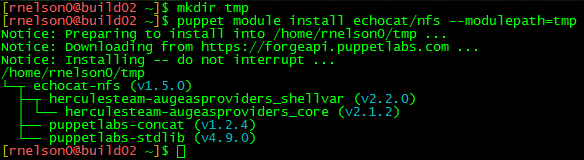
If you use puppet module install, it will install the module and all its dependencies for you. Give it a module and a new temporary directory, to ensure we don’t already have a dependency in our path, and you’ll end up with what you need.

Puppet module dependencies fig 1

In the past, I’ve shown how you can then use puppet module list and some search and replace patterns to convert to a Puppetfile, but it was all manual and it was scattered through the blog article. Here are some of the patterns you need, in vi format:

:%s/\s*[└┬├─]*\s/mod "/
:%s/ (v/", "/
:%s/)/"/
:%s/-/\//g

Vi is interactive, though, we can do better. Using the magic of sed, I generated a tool called generate-puppetfile that will install the specified modules in temp directories and use the module listing to build a Puppetfile for you.

Puppet module dependencies fig 2

I renamed the utility from depconvert to generate-puppetfile for clarity.

Download the utility (git clone https://github.com/rnelson0/puppet-generate-puppetfile.git). Run it and pass the names of modules you want to use. Currently there is no real error checking to be had, so if you enter an invalid name or no name, you won’t get what you want, but errors will be passed to the screen. I hope this helps!

NFS Export Settings for vSphere

Over the past few days, I’ve had to set up an NFS export for use with vSphere. I found myself frustrated with the vSphere docs because they only seem to cover the vSphere side of the house – when discussing the export that vSphere will use, the docs simply said, “Ask your vendor.” If you’re enabling NFS on your SAN and they have a one-click setup for you or a document with settings to enable, great, but if you’re setting up on a bare metal server or VM running Linux like me, you don’t have a vendor to ask.

Since I didn’t have a guide, I took a look at what happens when you enable NFS on a Synology. I don’t know if this is optimal, but this works for many people with the defaults. You can replicate this in Control Panel -> Shared Folders -> Highlight and Edit -> NFS Permissions. Add a new rule, add a hostname or IP entry, and hit OK. Here’s what the defaults look like:

NFS Exports fig 1

Let’s take a look at what happened in the busybox shell. SSH to your Synology as root with the admin password. Take a look at the permissions on the mount path (e.g. /volume1/rnelson0) and the contents of /etc/exports.

NFS Exports fig 2

(there is no carriage return at the end of the file, the ‘ds214>’ is part of the prompt not the exports contents)

A working mode for the directory is ‘0777’ and there’s a long string of nfs options. They are described in detail in the exports(5) man page. Here’s a high-level summary of each:

  • rw: Enable writes to the export (default is read-only).
  • async: Allow the NFS server process to accept additional writes before the current writes are written to disk. This is very much a preference and has potential for lost data.
  • no_wdelay: Do not delay writes if the server suspects (how? I don’t know) that another write is coming. This is a default with async so actually has no specific benefit here unless you remove async. This can have performance impacts, check whether wdelay is more appropriate.
  • no_root_squash: Do not map requests from uid/gid 0 (typically root) to the anonymous uid/gid.
  • insecure_locks: Do not require authentication of locking requests.
  • sec=sys: There are a number of modes, sys means no cryptographic security is used.
  • anonuid/anongid: The uid/gid for the anonymous user. On my Synology these are 1025/100 and match the guest account. Most Linux distros use 99/99 for the nobody account. vSphere will be writing as root so this likely has no actual effect.

I changed the netmask and anon(u|g)id values, as it’s most likely that a linux box with a nobody user would be the only non-vSphere client. Those should be the only values you need to change; async and no_wdelay are up to your preference.

If you use Puppet, you can automate the setup of your NFS server and exports. I use the echocat/nfs module from the forge (don’t forget the dependencies!). With the assumption that you already have a /nfs mount of sufficient size in place, the following manifest will create a share with the correct permissions and export flags for use with vSphere:

node server {
  include ::nfs::server

  file{ '/nfs/vsphere':
    ensure => directory,
    mode   => '0777',
  }
  ::nfs::server::export{ '/nfs/vsphere':
    ensure  => 'mounted',
    nfstag  => 'vsphere',
    clients => '10.0.0.0/24(rw,async,no_wdelay,no_root_squash,insecure_locks,sec=sys,anonuid=99,anongid=99)',
  }
}

To add your new datastore to vSphere, launch the vSphere Web Client. Go to the Datastores page, select the Datacenter you want to add the export to, and click on the Related Objects tab. Select Datastores and the first icon is to add a new datastore. Select NFS and the NFS version (new to vSphere 6), give your datastore a name, and provide the name of the export (/nfs/vsphere) and the hostname/IP of the server (nfs.example.com). Continue through the wizard, checking each host that will need the new datastore.

NFS Exports fig 3

Click Finish and you have a datastore that uses NFS! You may need to tweak the export flags for your environment, but this should be a good starting point. If you are aware of a better set of export flags, please let me know in the comments. Thanks!

vCenter Web Client and OVF deployment issues with Teredo

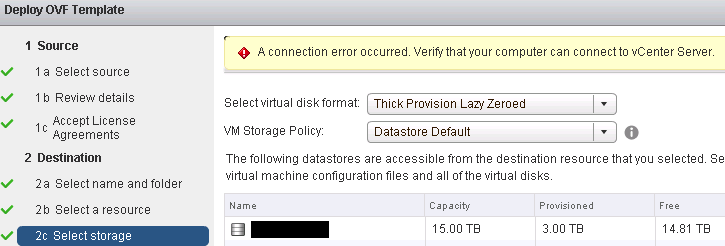
Tonight I was deploying an OVF on a newly upgraded vCenter version 6.0U1 through the vSphere Web Client. This is the Windows server (VCS), not the appliance (VCSA). I ran into this wonderful error while deploying an OVF on the storage selection step:

VCS Storage Issue Fig 1

There is KB 2053229 that says this was resolved in vCenter 5.1U2. However, the underlying issue is that the client attempts to communicate with the vCenter service in a new session to validate the storage and so the problem may remain in certain environments. I found that a teredo tunneling address was being used during storage selection rather than the IPv4 address that I connected to in my web browser. These addresses are provided for “free” with Windows Server 2008R2. The (magic?) design of teredo is that it should not be used when an IPv4 A record exists and should only be used for IPv6 URLs. I’m not sure why VCS would use this, just that I observed it being used. I discovered this with the help of two artifacts: 1) another node on a remote network was able to make it past storage selection; and 2) I saw a deny entry in syslog with my problematic management node to the VCS’s IPv4 addresses with IPv6 as the service:

VCS Storage Issue Fig 2

The KB article points to DNS, so I checked and found a AAAA record for vCenter. Delete that record, wait for it to replicate throughout Active Directory and expire, and reload the vSphere Web Client. You should no longer see a log failure for IPv6 and your OVF deploy should at least make it past the storage selection stage. I hope this helps!

Platform9 and vSphere Integration

Platform9 recently announced a vSphere Integration product. If you haven’t heard of Platform9 before, they offer OpenStack-as-a-Service for management of private cloud installations. Platform9 manages the OpenStack platform and you manage your virtualized infrastructure. You don’t have to know or keep up with the inner workings of OpenStack to have a working platform. This new product announcement expands the platform from the KVM hypervisor to the vSphere hypervisor.

OpenStack is a very complicated platform. Gaining the knowledge needed to design, setup, and maintain an OpenStack system is time and effort not spent on fulfilling your business goals. As the platform grows, more time and effort is required to stay current and upgrade your implementation. The use of an externally managed system saves you that time and effort and that can be put directly toward your business goals.

Disclaimer: Platform9 provided me with an extended free trial account for the purposes of this article.

How does it work?

Platform9 deploys an OpenStack controller just for you. They install, monitor, troubleshoot, and upgrade it for you. With vSphere integration, a local VM, called a vSphere Gateway Appliance (VGA), deployed in your vSphere environment communicates with your vCenter server and Platform9’s hosted controller, eliminating the need for a VPN or other private communication channel between the controller and vCenter.

Continue reading

Ravello and SimSpace: Security in the cloud

Ravello and SimSpace’s On-Demand Cyber Ranges

Last year, many of us were introduced to Ravello Systems and their nested virtualization product. Their hypervisor, HVX, and their network and storage overlay technologies allow you to run any VM from your enterprise on a cloud – specifically Amazon AWS and Google Compute Engine. You can sign up for a free trial and migrate your VMs into the cloud instantly.

Many in the #vExpert community have used Ravello to augment or replace their home lab. We’ve also seen some pretty interesting uses of Ravello over the last year – AutoLab in the cloud, Ravello/vCloud Air DR setups and numerous blueprints (pre-defined multi-node system designs) such as Puppet and Openstack on AWS.

Yesterday, I had the pleasure of speaking with SimSpace Corporation, a security company focused on cyber assessments, training, and testing. SimSpace has a history of working with and testing next generation cyber-security tools and helping their clients to rapidly build network models, called Cyber Ranges, using these tools at scale. Today, SimSpace and Ravello announced a partnership to expand this functionality and allow users to create their own cyber ranges in the cloud in a product called SimSpace VCN (press release). A VCN is a virtual clone network that is self-contained and isolated from the internet. VCN instances can be spun up and down on demand. This is a pretty awesome use of Ravello that goes a bit beyond what I’ve seen before.

Virtual Clone Networks and Use Cases

Each VCN starts as a blueprint and multiple instances can be deployed using Ravello’s hypervisor in the target cloud. You can deploy multiple DMZs, layer on additional networking like VLANs and port mirroring, and add just about anything else you want to replicate from your production environment. The network will contain not only the server OS VMs but a plethora of network and security devices from vendors such as Cisco, Checkpoint, Fortinet, and Palo Alto Networks. Existing policy settings (firewall, threat, etc.) can then be deployed on the appropriate VCN components. Each instance is completely isolated, allowing the user to treat each VCN as if it were production, but without the negative side effects if something goes wrong.  SimSpace’s traditional clientele would then run cyber defense simulations in the VCN to identify faults, train new users, and test the behavior of modifications such as replacing a firewall of one type with another or modifying policies. SimSpace’s product has an attack framework with the ability to inject common network attacks and even simulate “zero day” attacks.

I see a number of other use cases that SimSpace’s VCN product is useful for. The ability to replace a blueprint node or set of nodes can be used to test how different vendor’s products behave and whether they are suitable for the environment. Even in a virtualized data center, lab testing is often not representative of production behavior, but making the change in production is highly risky and expensive. Testing in a VCN can help provide similar scale to production that a lab cannot and at greatly reduced cost and risk.

Another potential use case is disaster recovery’s awkward sibling, business continuity (BC). Disaster recovery typically involves an online site where some portion of the system is always hot, at least to receive data replication from the primary environment. Business continuity, on the other hand, tends to involve cold and sometimes non-existent datacenters that are built from scratch to provide a minimum level of service during crisis times. Most BC exercises involve numerous runbooks and often end with some level of failure as runbooks tend to get out of date quickly. A VCN, however, can be generated rapidly from production documentation and deployed in less than an hour (more details below) and without the expensive of standby hardware or a business continuity contract.

Finally, auditing for compliance is always tricky. For example, the latest version of PCI-DSS standards require penetration testing, which introduces risks that some tests could cause outages or destroy data. Giving the auditor access to the VCN replica of production allows you and the auditor to map out the likely impact of penetration testing in a controlled manner with zero risk, enumerating the most likely outage scenarios and avoiding surprises. When the real penetration testing occurs in production, the risk can be reduced to an acceptable level for the business.

Product Offerings

SimSpace’s product will be offered in two flavors. A number of pre-defined blueprints exist that can be taken advantage of by users whose production environments closely match or who do not need a higher level of fidelity. These users can be up and running with their first VCN in about an hour, including signup time.

Customers who desire a higher level of fidelity or whose environments do not match the pre-defined blueprints can engage SimSpace about a customized VCN blueprint. SimSpace has a number of tools they are developing, the most promising of which works with Visio-like network diagrams that can be exported as a blueprint. The tool aims to be as simple as adding some metadata (IP, hostname, OS, etc.) to an existing diagram which should result in rapid turnarounds. If the VCN’s blueprint is updated, only the changes need to be deployed to the instance so deployment times remain low.

How It Works

SimSpace has shared some under-the-covers details with me. Each VM has at least two vNICS, one connected to a management network. All the management traffic is segregated from the production network to ensure management has no affect on the security testing results. Puppet is used to manage much of the node configuration, including networking and any user-provided software deployments. Just upload your software to the provided repository and assign the correct version to each node, puppet does the rest. (I mention this for no particular reason of course!) Spinning up a VCN instance with ~40 nodes takes less than 10 minutes for Ravello to deploy and 10 minutes for SimSpace to populate and configure, or about 20 minutes for an average configuration. The minimum network size is about 20 nodes and the current maximum is around 80 nodes. Their developers are pushing that to 150 nodes in tests now and will continue to increase that number.

In addition to replicating your production environment, SimSpace has a “internet bubble” component that can be added to any blueprint that adds a fake internet. A few VMs with thousands of IPs are able to replicate some level of core routing, root DNS, and fake versions of Facebook, Google, and other popular websites, to help simulate the isolated VCN communicating with the greater internet. I imagine this is helpful if you want to test some watering hole exploits or DNS amplification attacks.

There is currently no provided cost for the service. The target model is a monthly subscription service with additional fees for cloud usage and commercial licenses used in the VCN. Commercial licenses for products in each VCN instance will be handled by SimSpace, so there’s no need for users to worry about vendor management with SimSpace VCN. An early access program will be starting in the next week or two and general availability is expected in the 4th quarter of 2015. If you’re interested in the early access program, you can contact SimSpace directly.

All in all, I am very excited about SimSpace VCN. The amount of functionality it enables and the risk it reduces should have value to many individuals and businesses, and the reduction in cost of test environments is nearly limitless. Technologically, it’s also a really novel and powerful use of Ravello’s nested virtualization technology. I cannot wait to see SimSpace VCN in action and see its promise realized.

PHP Unit Testing

I recently needed to investigate unit testing in PHP. I’m familiar with but not very well versed in PHP, and I’m certainly not a PHP aficionado, but a quick google search turned me on to PHPUnit by Sebastian Bergmann. The docs appear very complete and there’s a nice Getting Started guide to keep it simple. Using this tutorial and the accompanying GitHub repo, you can be up and running in a few minutes. Unfortunately, I ran into some problems because I am using PHP 5.3.3 (CentOS EL 6) and I was trying a literal copy and paste instead of using the provided repo. Don’t copy and paste, just use the repo. However, I managed to learn something by doing this.

PHP Versions

The simpler issue is PHP 5.3.3. I installed phpunit per the directions in the Getting Started guide. Here’s what happens when I clone the Money repo and run phpunit:

[rnelson0@build01 money:master]$ git remote -v
origin  git@github.com:sebastianbergmann/money.git (fetch)
origin  git@github.com:sebastianbergmann/money.git (push)
[rnelson0@build01 money:master]$ phpunit --bootstrap src/autoload.php tests/MoneyTest.php
PHP Parse error:  syntax error, unexpected T_CLASS, expecting T_STRING or T_VARIABLE or '$' in /home/rnelson0/php/money/tests/MoneyTest.php on line 55

The current version requires PHP 5.5. It’s okay, there’s an older version we can use in the 1.5 branch. Check it out, run phpunit again, and everything works.

[rnelson0@build01 money:master]$ git branch -a
  1.5
  1.6
* master
  remotes/origin/1.5
  remotes/origin/1.6
  remotes/origin/HEAD -> origin/master
  remotes/origin/master
  remotes/origin/php-7
[rnelson0@build01 money:master]$ git checkout 1.5
Switched to branch '1.5'
[rnelson0@build01 money:1.5]$ phpunit --bootstrap src/autoload.php tests/MoneyTest.php
PHPUnit 4.8.2 by Sebastian Bergmann and contributors.

..............................S

Time: 665 ms, Memory: 18.75Mb

OK, but incomplete, skipped, or risky tests!
Tests: 31, Assertions: 50, Skipped: 1.

To Autoload, or not to Autoload

The second issue, where I copied the test code directly from the tutorial, was a little trickier. You are supposed to use the file src/autoload.php, but the tutorial does not provide it. You can see the full file in the repo, here’s an important snippet:

spl_autoload_register(
    function($class) {
        static $classes = null;
        if ($classes === null) {
            $classes = array(
                //...
                'sebastianbergmann\\money\\currency' => '/Currency.php',
                'sebastianbergmann\\money\\currencymismatchexception' => '/exceptions/CurrencyMismatchException.php',
                //...
                'sebastianbergmann\\money\\money' => '/Money.php',
                //...

This function maps the namespace’d classes to the files they are located in. I have not gone through the PHPUnit docs in great detail yet, but I haven’t seen instructions on generating this dynamically or crafting it manually. It’s certainly not part of the tutorial, so I decided to see if I could get around this with brute force. First, I generated a simple namespace and class, NewProject\Base.

<?php

namespace NewProject;

class Base {
  /**
   * @var integer
   */
  private $counter;

  /**
   * param integer $count
   */
  public function __construct($counter) {
    if (!is_int($counter)) {
      throw new \InvalidArgumentException('$counter must be an Integer');
    }
    $this->counter = $counter;
  }

  /**
   * Return the current counter value
   *
   * @return integer
   */
  public function getCount() {
    return $this->counter;
  }

  /**
   * Increase the counter and return its current value
   *
   * @return integer
   */
  public function increaseCount() {
    $this->counter++;

    return $this->counter;
  }
}

?>

The comments are there for PHPUnit. I think I’m doing it right, but I’m still new to this so it may not be accurate. This is also a very contrived class that exists just to do some testing, but for that purpose it’s great! Next, we need a class to do the testing. The name of the class is <Class>Test and it extends the PHPUnit_Framework_TestCase (there are others, but we’re starting small). Here’s the first draft:

<?php
namespace NewProject;

class BaseTest extends \PHPUnit_Framework_TestCase {
  /**
   * @covers NewProject\Base::__construct
   */
  public function testConstructor() {
    new Base(0);
  }

  public function testShouldFail() {
    new Base('string');
  }
}
?>

With unit tests, you want everything to pass, but I put the last one in because I wanted to make sure that an actual failure would be detected as a failure, not as a syntax error or something else that would bomb out the entire test suite. Here’s what happens when you run phpunit against that without an autoload file:

[rnelson0@build01 NewProject]$ phpunit tests
PHPUnit 4.8.2 by Sebastian Bergmann and contributors.

PHP Fatal error:  Class 'NewProject\Base' not found in /home/rnelson0/php/NewProject/tests/BaseTest.php on line 9

Well, shoot. It’s not loading the underlying class that it needs to test, and I don’t know how to generate an autoload file yet. Since it can’t find the class, I tried to see if I could force it to load that by adding a require() statement (emphasis on the additional line):

[rnelson0@build01 NewProject]$ cat tests/BaseTest.php
<?php
namespace NewProject;

require ('src/Base.php');

class BaseTest extends \PHPUnit_Framework_TestCase {
  /**
   * @covers NewProject\Base::__construct
   */
  public function testConstructor() {
    new Base(0);
  }

  public function testShouldFail() {
    new Base('string');
  }
}
?>
[rnelson0@build01 NewProject]$ phpunit tests
PHPUnit 4.8.2 by Sebastian Bergmann and contributors.

.E

Time: 221 ms, Memory: 18.25Mb

There was 1 error:

1) NewProject\BaseTest::testShouldFail
InvalidArgumentException: $counter must be an Integer

/home/rnelson0/php/NewProject/src/Base.php:16
/home/rnelson0/php/NewProject/tests/BaseTest.php:15

FAILURES!
Tests: 2, Assertions: 0, Errors: 1.

Lo and behold, that works! I’m sure at some point I’ll figure out how to generate the autoload, but this is good enough for now.

Summary

I’m well on my way to unit testing with PHP, thanks to Sebastian’s awesome framework. Thank you, Sebastian, you have taken much of the suck out of PHP!

You can find my test repo on github.

Why I Blog

I’ve wanted to write about why I blog for a while, and I was recently encouraged to stop procrastinating by Mattias Geniar:

Much is said, and frequently, about why you should blog. As I find most such articles to be impersonal, I thought I might share the reasons and rewards that have driven me to blog and keep me going at it. So, why do I blog?

  • To express myself. Sometimes this means artistically – being creative and showing it off – but other times it simply means organizing my thoughts and presenting them to other human beings. This forces me to clarify my thoughts, construct an actual hypothesis, and begin to test it. The end result is a refined idea that can be actually be consumed by myself and others. This is especially helpful if I will be presenting the idea to my boss or coworkers, even when that is done in a different format or medium.
  • To improve at writing. Communication is vital in any relationship, personal or business, and the written word can be tricky to wield effectively. I write emails every day, but I had not written a long-form article since college (15+ years ago, at the time!) and not on deeply technical subjects. I like to think this has been paying off for me, even with non-written communication as I’ve become more methodical and self-aware of how I communicate in all forms.
  • For community. I consume a lot from a number of different communities – security, virtualization, automation, etc. – and I feel that a good citizen contributes back when possible. Maybe I only help one other person, but I hope that I enable or inspire that person to do something awesome – like get home an hour earlier to spend more time with their family that evening.
  • As a portfolio of work. We all need to keep a portfolio, resume, C.V., etc. A blog is part of that – even if I don’t view it as a portfolio, others may, so it’s in my best interest to treat it as such. I keep this in mind before hitting publish – is this something that I want other people to see? Is it of high enough quality? Does it say something worthwhile? Does it send a positive message? Will someone else want to read this, and would they be satisfied if they did? Set your bar high and make sure you’re hitting it every time you publish something.
  • For recognition. This isn’t a very altruistic reason, but it has contributed to my efforts. A desire to write well enough to have a popular blog used by people everyday isn’t a bad thing to aim for, is it? Page views also give feedback on who your audience actually is, not who you think they are, and helps you see how they react to various article types and formats. Stats drive my morale and motivation. I like seeing that my page views went up 10% for a week, it makes me more eager to blog again. If page views go down for a few weeks, I want to know why and do better. Use it as a healthy feedback loop for your writing.

The last two reasons may seem a bit selfish, but I think that blogging as an independent is in many ways inherently self-serving. Improving my writing probably benefits me even more than building a portfolio or gaining recognition. Regardless, we all have egos and by acknowledging how they drive us, we can harness our drive rather than be controlled by it.

However, the most rewarding reason I blog, by far, is:

  • For my future self. I’ve referenced my own blog numerous times and even it had it come up as a Google result when I forgot that I had already solved a problem. Writing, reading, and applying my own article is a great feedback loop. Do something, write about it, do it again based on the article, rewrite the article, repeat until accurate. All the assumed knowledge is discovered and added to the article, bit by bit, so that anyone can follow the process. This is a practice you can apply to general documentation, as well. I also follow my own blog articles to replicate the results from my lab work, in my work environment (e.g. everything puppet related). This is critical to me, as I can prove to myself that I really have gained an understanding of the subject matter.

If you’re looking at blogging anytime soon, think about what it is you intend to get out of it. It can be extremely rewarding, but only if you go into it with some awareness. Have fun!

Customizing bash and vim for better git and puppet use

Welcome back to our Puppet series. I apologize for the extended hiatus and thank you for sticking around! As an added bonus, in addition to inlining files, I’m including links to the corresponding files and commits in my PuppetInABox project so you can easily review the files and browse around as needed. I hope this is helpful!

Today, we will look at improving our build server. The build role is a centralized server where we can do our software development, including work on our puppet code and creating packages with FPM. When we work with git, we have to run git branch to see what branch we’re in. If you’re like me, this has led to a few uses of git stash and in some cases having to redo the work entirely once you start committing on the long branch. To help, we’re going to add the currently-active branch name of any git directory we are in to the PS1 prompt. We also are doing a lot of edits of *.pp files and we don’t have any syntax highlighting or auto-indenting going on. We can fix that with a few modifications, and we’ll discuss where additional customizations can be made.

Continue reading